/* global React, Icon, APPS, PhoneFrame, PVRScreen, MCCScreen, TTScreen, DCScreen, useReveal */
const { useEffect: useEffectA, useState: useStateA } = React;

const SCREEN_COMPONENTS = {
  "private-video-recorder": PVRScreen,
  "motion-clock-camera": MCCScreen,
  "truetide": TTScreen,
  "dual-camera": DCScreen,
};

// Shared wrapper for app page
const AppPage = ({ app, navigate, children }) => {
  useReveal();
  useEffectA(() => {
    document.documentElement.style.setProperty("--accent", app.accent);
    document.documentElement.style.setProperty("--accent-2", app.accent);
  }, [app]);
  return (
    <div className="page-enter" style={{"--accent": app.accent}}>
      {children}
      {/* Final CTA */}
      <section className="section">
        <div className="container">
          <div className="reveal" style={{
            border: `1px solid ${app.accent}40`,
            borderRadius: "var(--radius-lg)",
            padding: "56px 48px",
            background: `linear-gradient(135deg, ${app.accent}15, transparent 70%)`,
            position: "relative", overflow: "hidden", textAlign: "center",
          }}>
            <div style={{position:"absolute",inset:0,background:`radial-gradient(ellipse at center, ${app.accent}25, transparent 60%)`,pointerEvents:"none"}}></div>
            <div style={{position:"relative"}}>
              {app.comingSoon ? (
                <>
                  <h2 style={{fontFamily:"var(--font-display)",fontWeight:600,fontSize:"clamp(28px, 4vw, 44px)",letterSpacing:"-0.02em",margin:"0 0 16px"}}>
                    {app.short} is on the way.
                  </h2>
                  <p style={{color:"var(--text-2)",maxWidth:520,margin:"0 auto 28px",fontSize:16}}>
                    Currently in development. Drop your email and we'll let you know the moment it lands on the App Store and Google Play.
                  </p>
                  <NotifyForm accent={app.accent}/>
                </>
              ) : (
                <>
                  <h2 style={{fontFamily:"var(--font-display)",fontWeight:600,fontSize:"clamp(28px, 4vw, 44px)",letterSpacing:"-0.02em",margin:"0 0 16px"}}>
                    Get {app.short}.
                  </h2>
                  <p style={{color:"var(--text-2)",maxWidth:520,margin:"0 auto 28px",fontSize:16}}>
                    Available on iOS and Android. {app.id === "private-video-recorder" ? "One-time purchase." : "Free to try."}
                  </p>
                  <DownloadBadges accent={app.accent} app={app}/>
                </>
              )}
            </div>
          </div>
          <div style={{textAlign:"center",marginTop:32}}>
            <button className="btn btn-ghost" onClick={() => navigate("home")}>← All apps</button>
          </div>
        </div>
      </section>
    </div>
  );
};

const NotifyForm = ({ accent }) => {
  const [email, setEmail] = useStateA("");
  const [submitted, setSubmitted] = useStateA(false);
  const submit = (e) => {
    e.preventDefault();
    if (!/^[^\s@]+@[^\s@]+\.[^\s@]+$/.test(email)) return;
    setSubmitted(true);
  };
  if (submitted) {
    return (
      <div style={{display:"inline-flex",alignItems:"center",gap:10,padding:"12px 20px",border:`1px solid ${accent}80`,background:`${accent}15`,borderRadius:12,color:accent,fontWeight:600}}>
        <Icon name="check" size={16} stroke={2.4}/> Thanks — we'll be in touch.
      </div>
    );
  }
  return (
    <form onSubmit={submit} style={{display:"inline-flex",gap:10,flexWrap:"wrap",justifyContent:"center"}}>
      <input
        type="email"
        required
        placeholder="you@somewhere.com"
        value={email}
        onChange={(e) => setEmail(e.target.value)}
        style={{
          background: "rgba(0,0,0,0.4)",
          border: `1px solid ${accent}40`,
          borderRadius: 11,
          padding: "11px 16px",
          color: "var(--text)",
          fontFamily: "inherit",
          fontSize: 15,
          minWidth: 260,
        }}
      />
      <button type="submit" className="btn" style={{background: accent, color: "#0a0a10", fontWeight: 700}}>
        Notify me <Icon name="arrow-right" size={15}/>
      </button>
    </form>
  );
};

const FeaturedBanner = ({ src, accent, alt }) => (
  <section style={{padding: "12px 0 48px"}}>
    <div className="container">
      <div className="reveal" style={{
        borderRadius: 18,
        overflow: "hidden",
        border: `1px solid ${accent}30`,
        boxShadow: `0 20px 50px ${accent}20`,
        background: "#000",
        position: "relative",
      }}>
        <div style={{position:"absolute",inset:0,background:`radial-gradient(ellipse at center, ${accent}25, transparent 65%)`,pointerEvents:"none",zIndex:1}}></div>
        <img src={src} alt={alt} style={{display:"block",width:"100%",height:"auto",position:"relative",zIndex:0}}/>
      </div>
    </div>
  </section>
);

const DownloadBadges = ({ accent, app, justify = "center" }) => {
  const playHref = app?.playUrl || null;
  const appStoreHref = app?.appStoreUrl || null;
  const linkProps = (href) => href
    ? { href, target: "_blank", rel: "noopener noreferrer", style: {textDecoration: "none", color: "inherit"} }
    : { style: {opacity: 0.55, cursor: "not-allowed"}, title: "Coming soon" };

  const AppStoreBadge = appStoreHref ? "a" : "div";
  const PlayBadge = playHref ? "a" : "div";

  return (
    <div className="dl-row" style={{justifyContent: justify}}>
      <AppStoreBadge className="dl-badge" {...linkProps(appStoreHref)}>
        <svg viewBox="0 0 24 24" fill="currentColor"><path d="M17.05 20.28c-.98.95-2.05.8-3.08.35-1.09-.46-2.09-.48-3.24 0-1.44.62-2.2.44-3.06-.35C2.79 15.25 3.51 7.59 9.05 7.31c1.35.07 2.29.74 3.08.8 1.18-.24 2.31-.93 3.57-.84 1.51.12 2.65.72 3.4 1.8-3.12 1.87-2.38 5.98.48 7.13-.57 1.5-1.31 2.99-2.54 4.09zM12.03 7.25c-.15-2.23 1.66-4.07 3.74-4.25.29 2.58-2.34 4.5-3.74 4.25z"/></svg>
        <div>
          <div className="label">Download on the</div>
          <div className="name">App Store</div>
        </div>
      </AppStoreBadge>
      <PlayBadge className="dl-badge" {...linkProps(playHref)}>
        <svg viewBox="0 0 24 24" fill="currentColor"><path d="M3.609 1.814 13.792 12 3.61 22.186a.996.996 0 0 1-.61-.92V2.734a1 1 0 0 1 .609-.92zm10.89 10.893 2.302 2.302-10.937 6.333 8.635-8.635zm3.199-3.199 2.807 1.626a1 1 0 0 1 0 1.732l-2.808 1.626L15.198 12l2.5-2.492zM5.864 2.658 16.802 8.99l-2.302 2.302-8.636-8.634z"/></svg>
        <div>
          <div className="label">Get it on</div>
          <div className="name">Google Play</div>
        </div>
      </PlayBadge>
    </div>
  );
};

// ===== Private Video Recorder page =====
const PVRPage = ({ navigate }) => {
  const app = APPS[0];
  return (
    <AppPage app={app} navigate={navigate}>
      {/* HERO — black + green, bold caps */}
      <section className="app-hero" style={{paddingTop: 56, paddingBottom: 64}}>
        <div className="container">
          <div className="app-hero-grid">
            <div className="reveal in">
              <div className="app-hero-eye"><span className="dot"></span> ENCRYPTED · LOCAL · NO CLOUD</div>
              <h1 style={{
                fontFamily: '"Space Grotesk", sans-serif',
                fontWeight: 700,
                fontSize: "clamp(44px, 6.5vw, 84px)",
                letterSpacing: "-0.03em",
                lineHeight: 0.95,
                textTransform: "uppercase",
              }}>
                Private<br/>
                <span style={{color: app.accent, textShadow: `0 0 30px ${app.accent}80`}}>Video Recording.</span>
              </h1>
              <p style={{fontSize: 19, color: "var(--text-2)", maxWidth: 540, margin: "24px 0 32px", lineHeight: 1.55}}>
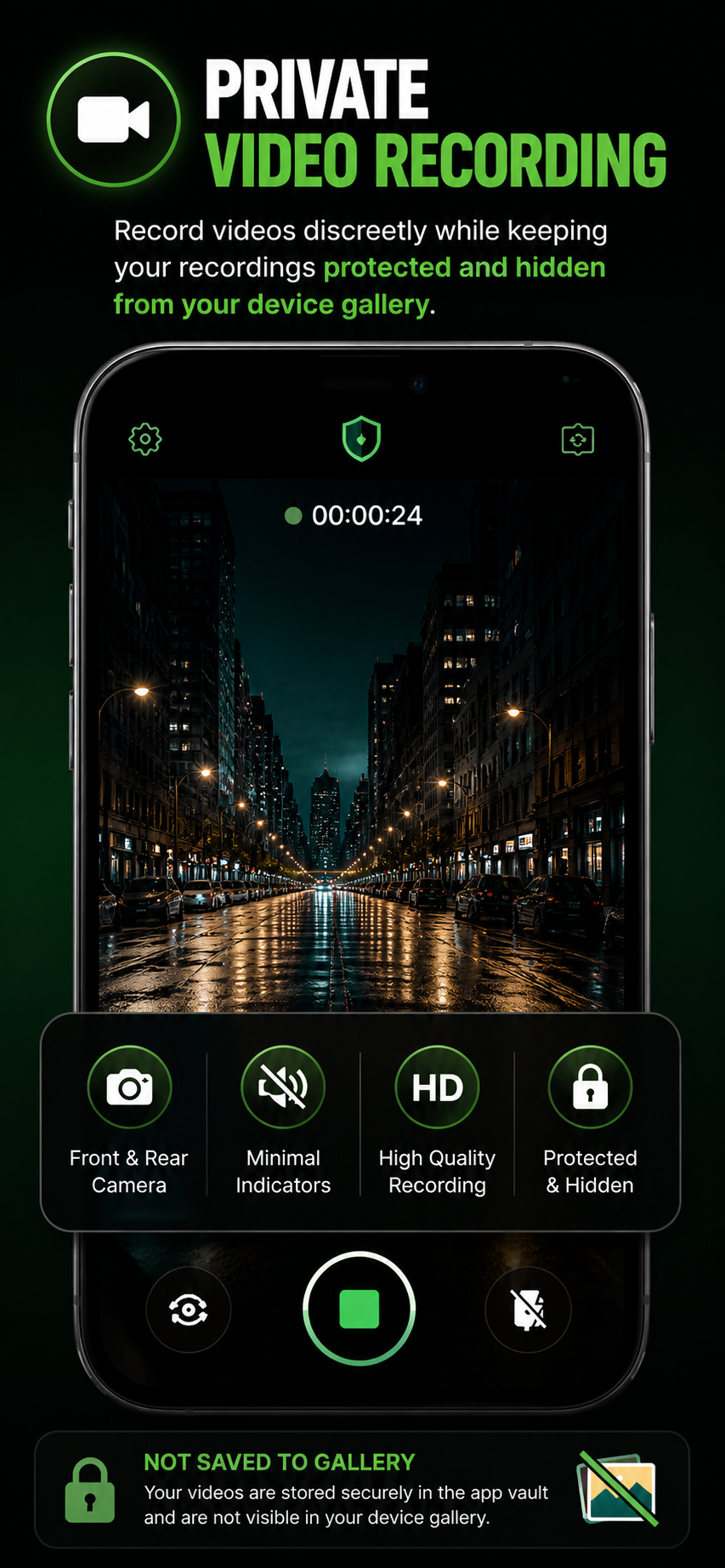
                Record videos discreetly while keeping your recordings <span style={{color: app.accent, fontWeight: 600}}>protected and hidden</span> from your device gallery.
              </p>
              <DownloadBadges accent={app.accent} app={app}/>
            </div>
            <div className="app-mockup reveal in">
              <div className="accent-glow" style={{background: `radial-gradient(circle, ${app.accent}, transparent 65%)`, opacity: 0.5}}></div>
              <img src="assets/pvr/01.png" alt="Private Video Recorder hero"
                style={{position:"relative",zIndex:1,maxHeight: 600, borderRadius: 20, filter: `drop-shadow(0 30px 60px ${app.accent}40)`}}/>
            </div>
          </div>
        </div>
      </section>

      <FeaturedBanner src="assets/pvr/featured.png" accent={app.accent} alt="Private Video Recorder featured"/>

      {/* Feature highlights — 4 pill features */}
      <section style={{padding: "32px 0 64px"}}>
        <div className="container">
          <div className="reveal" style={{
            display: "grid",
            gridTemplateColumns: "repeat(4, 1fr)",
            gap: 0,
            border: `1px solid ${app.accent}30`,
            borderRadius: 18,
            background: "rgba(0,0,0,0.5)",
            overflow: "hidden",
          }}>
            {[
              {icon: "camera", label: "Front & Rear Camera"},
              {icon: "eye-off", label: "Minimal Indicators"},
              {icon: "video", label: "High Quality Recording"},
              {icon: "lock", label: "Protected & Hidden"},
            ].map((f, i, arr) => (
              <div key={i} style={{
                padding: "28px 20px",
                textAlign: "center",
                borderRight: i < arr.length - 1 ? `1px solid ${app.accent}20` : "none",
              }}>
                <div style={{
                  width: 48, height: 48, borderRadius: "50%",
                  background: "rgba(0,0,0,0.6)",
                  border: `2px solid ${app.accent}`,
                  display: "grid", placeItems: "center",
                  margin: "0 auto 12px",
                  boxShadow: `0 0 24px ${app.accent}50`,
                  color: app.accent,
                }}>
                  <Icon name={f.icon} size={20} stroke={2}/>
                </div>
                <div style={{fontSize: 13, fontWeight: 600, color: "#fff"}}>{f.label}</div>
              </div>
            ))}
          </div>
        </div>
        <style>{`
          @media (max-width: 760px) {
            .app-hero-grid + section [style*="grid-template-columns: repeat(4"] { grid-template-columns: repeat(2, 1fr) !important; }
          }
        `}</style>
      </section>

      {/* Hidden & Protected feature */}
      <section className="section-tight">
        <div className="container">
          <div className="feature-row reveal" style={{borderTop: "none", paddingTop: 32}}>
            <div className="feature-row-text">
              <div className="eyebrow" style={{color: app.accent}}>HIDDEN & PROTECTED</div>
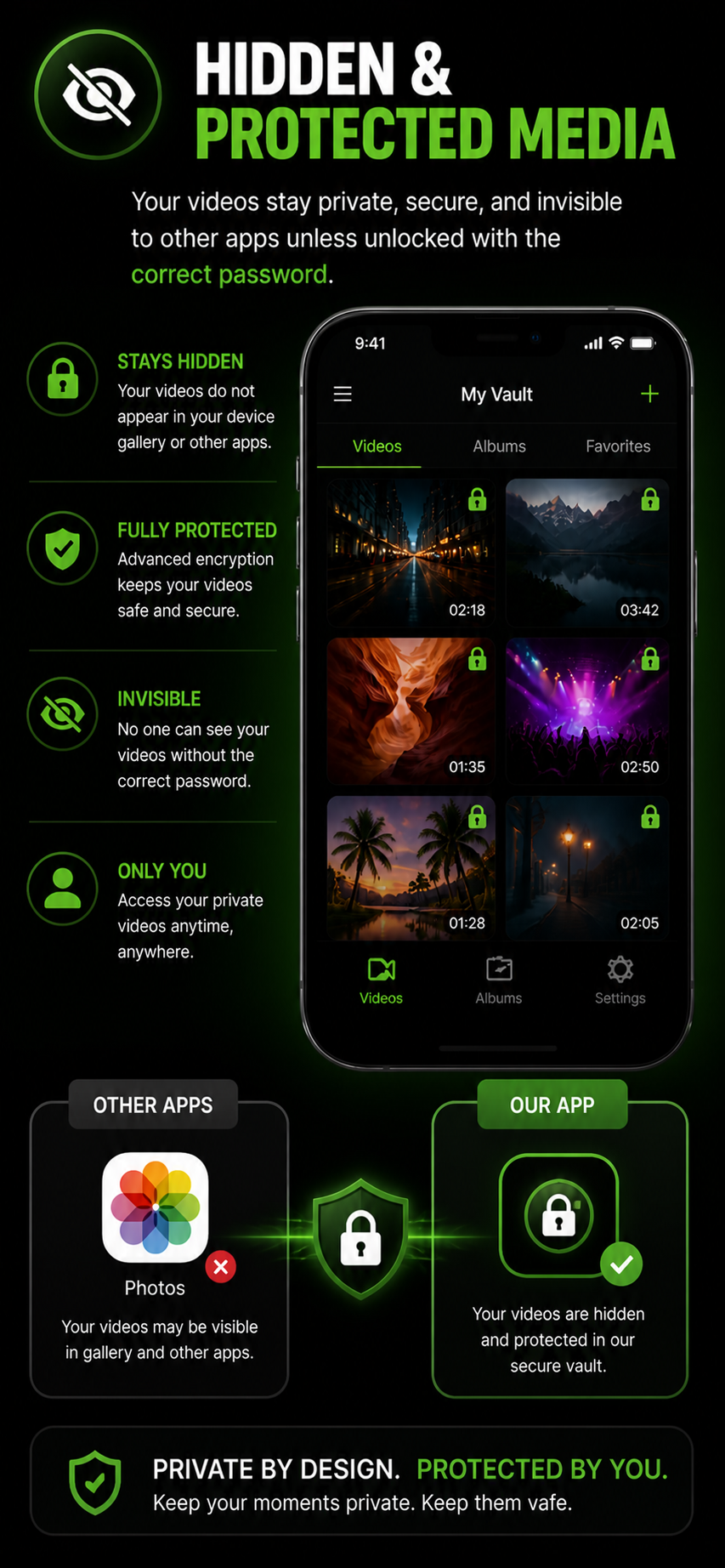
              <h2>Your videos stay private, secure, and invisible to other apps.</h2>
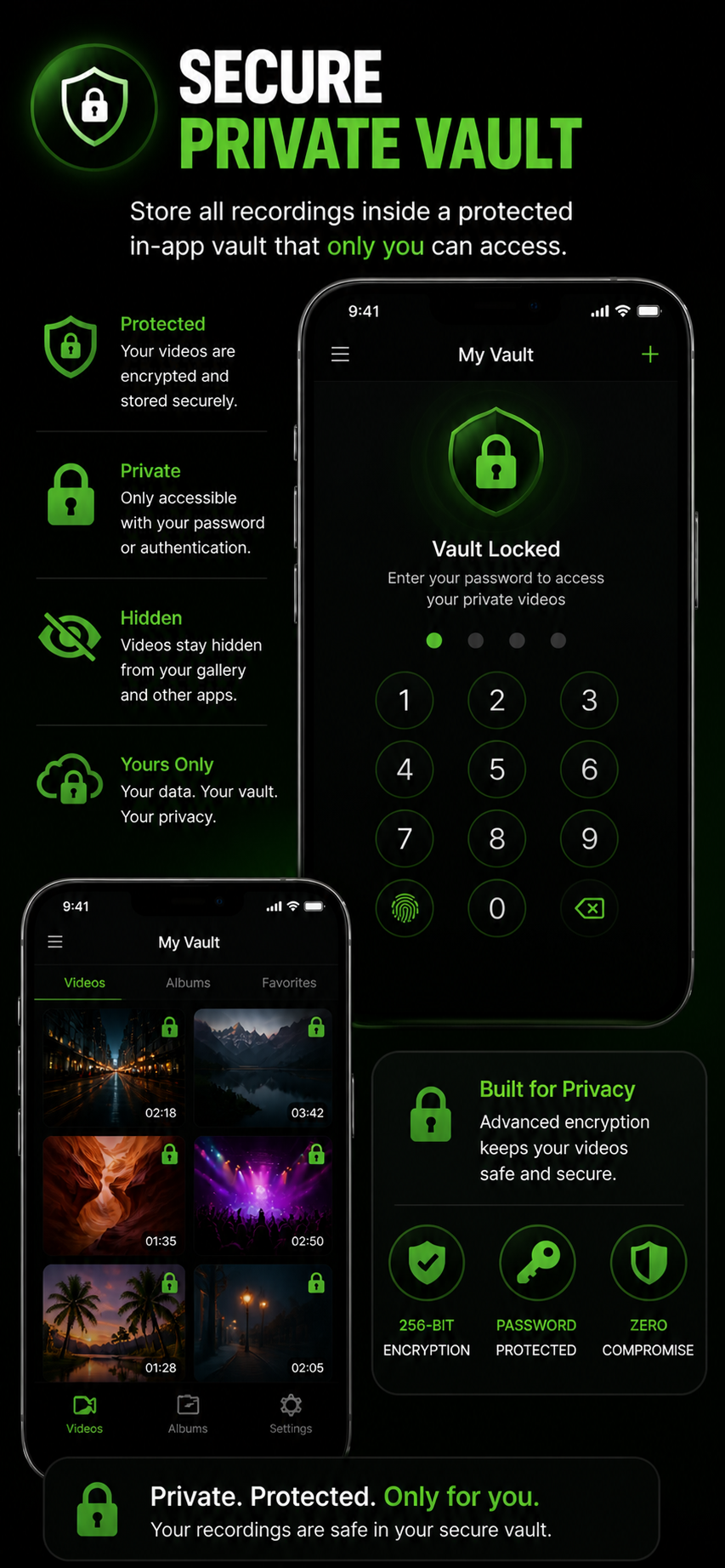
              <p>Recordings live inside an encrypted vault — they don't appear in your device gallery, don't get picked up by iCloud or Google Photos, and don't show up in screen recordings of other apps. Encrypted in transit and at rest.</p>
              <ul style={{listStyle: "none", padding: 0, margin: "20px 0 0", display: "grid", gap: 10}}>
                {[
                  ["Stays hidden", "Your videos do not appear in your device gallery or other apps."],
                  ["Fully protected", "Advanced 256-bit encryption keeps your videos safe and secure."],
                  ["Invisible", "No one can see your videos without the correct password."],
                  ["Only you", "Access your private videos anytime, anywhere."],
                ].map(([t, d]) => (
                  <li key={t} style={{display: "flex", gap: 14}}>
                    <div style={{flexShrink: 0, width: 26, height: 26, borderRadius: "50%", border: `1.5px solid ${app.accent}`, display: "grid", placeItems: "center", color: app.accent, marginTop: 2}}>
                      <Icon name="check" size={14} stroke={2.5}/>
                    </div>
                    <div>
                      <div style={{fontWeight: 700, color: app.accent, fontSize: 14, letterSpacing: "0.04em", textTransform: "uppercase"}}>{t}</div>
                      <div style={{color: "var(--text-2)", fontSize: 15, marginTop: 2}}>{d}</div>
                    </div>
                  </li>
                ))}
              </ul>
            </div>
            <div style={{display:"grid",placeItems:"center"}}>
              <img src="assets/pvr/02.png" alt="Hidden & protected media" style={{maxHeight: 600, borderRadius: 16, filter: `drop-shadow(0 20px 40px ${app.accent}30)`}}/>
            </div>
          </div>
        </div>
      </section>

      {/* Discreet black screen */}
      <section className="section-tight">
        <div className="container">
          <div className="feature-row reveal">
            <div style={{display:"grid",placeItems:"center"}}>
              <img src="assets/pvr/04.png" alt="Discreet black screen mode" style={{maxHeight: 600, borderRadius: 16, filter: `drop-shadow(0 20px 40px ${app.accent}30)`}}/>
            </div>
            <div className="feature-row-text">
              <div className="eyebrow" style={{color: app.accent}}>BLACK SCREEN MODE</div>
              <h2>Record while the screen looks <span style={{color: app.accent}}>off.</span></h2>
              <p>Tap once. The screen goes dark. Recording continues without drawing attention. Tap again to bring it back.</p>
              <ul style={{listStyle: "none", padding: 0, margin: "20px 0 0", display: "grid", gap: 12}}>
                {[
                  "Tap to hide — turn the screen off while recording",
                  "Recording continues in the background",
                  "Perfect for low-profile capture in any situation",
                ].map((t) => (
                  <li key={t} style={{display:"flex",gap:10,alignItems:"center",color:"var(--text-2)",fontSize:15}}>
                    <div style={{width: 6, height: 6, borderRadius: "50%", background: app.accent, boxShadow: `0 0 6px ${app.accent}`}}></div>
                    {t}
                  </li>
                ))}
              </ul>
            </div>
          </div>
        </div>
      </section>

      {/* Per-video password */}
      <section className="section-tight">
        <div className="container">
          <div className="feature-row reveal">
            <div className="feature-row-text">
              <div className="eyebrow" style={{color: app.accent}}>PER-VIDEO PASSWORD</div>
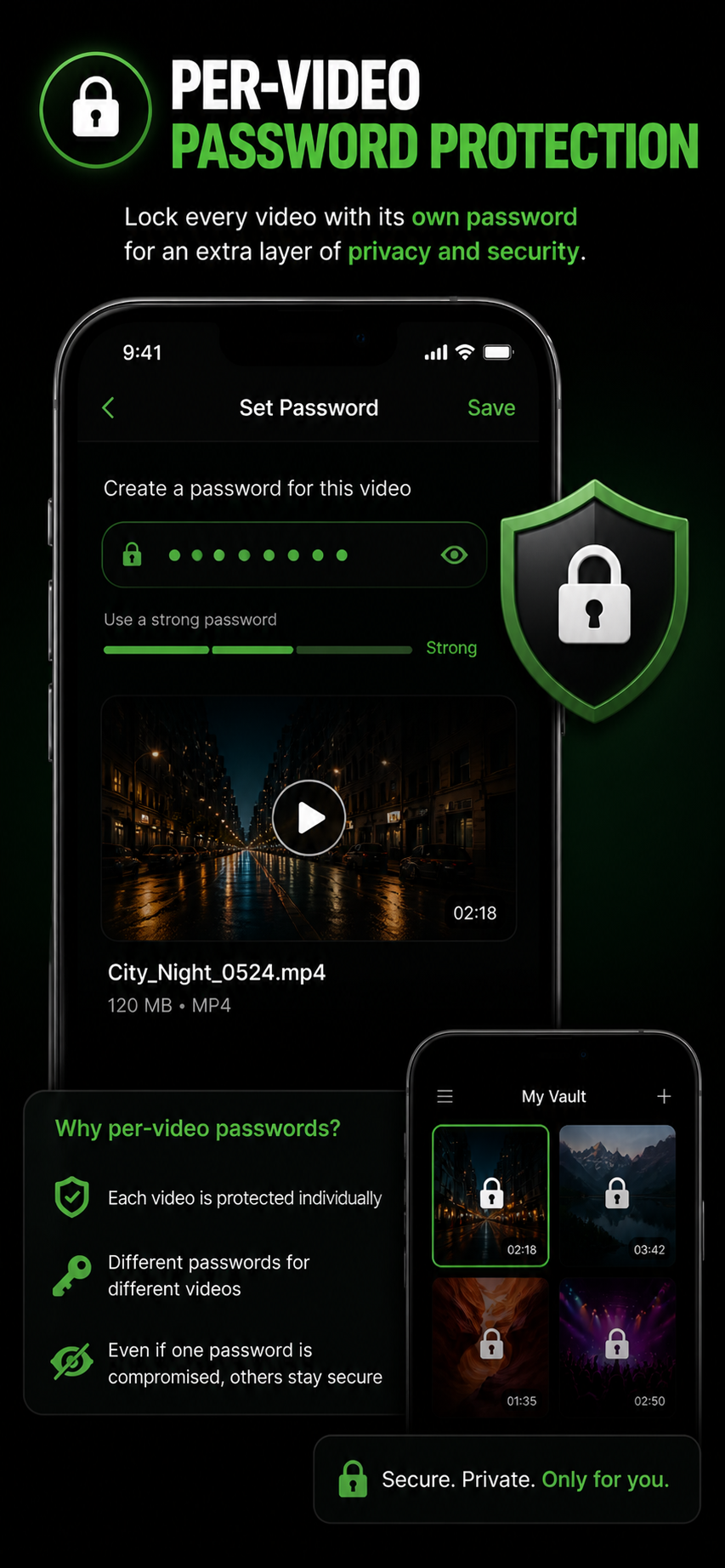
              <h2>Lock every video with its own password.</h2>
              <p>Even if one password is compromised, the others stay secure. A second layer of privacy for the recordings that matter most.</p>
            </div>
            <div style={{display:"grid",placeItems:"center"}}>
              <img src="assets/pvr/05.png" alt="Per-video password" style={{maxHeight: 600, borderRadius: 16, filter: `drop-shadow(0 20px 40px ${app.accent}30)`}}/>
            </div>
          </div>
        </div>
      </section>

      {/* Gallery */}
      <section className="section-tight">
        <div className="container">
          <div className="reveal">
            <div className="eyebrow" style={{color: app.accent}}>SCREENSHOTS</div>
            <h2 className="section-title" style={{fontSize: "clamp(28px, 4vw, 40px)", marginBottom: 32}}>See it in action.</h2>
          </div>
          <div className="gallery">
            {[1,2,3,4,5].map(n => (
              <div key={n} style={{flexShrink: 0, scrollSnapAlign: "center", borderRadius: 14, overflow: "hidden", border: `1px solid ${app.accent}30`, boxShadow: `0 10px 30px ${app.accent}20`, background: "#000"}}>
                <img src={`assets/pvr/0${n}.png`} alt={`Screen ${n}`} style={{height: 540, display: "block"}}/>
              </div>
            ))}
          </div>
        </div>
      </section>
    </AppPage>
  );
};

// ===== Motion Clock Camera page =====
const MCCPage = ({ navigate }) => {
  const app = APPS[1];
  return (
    <AppPage app={app} navigate={navigate}>
      <section className="app-hero">
        <div className="container">
          <div className="app-hero-grid">
            <div className="reveal in">
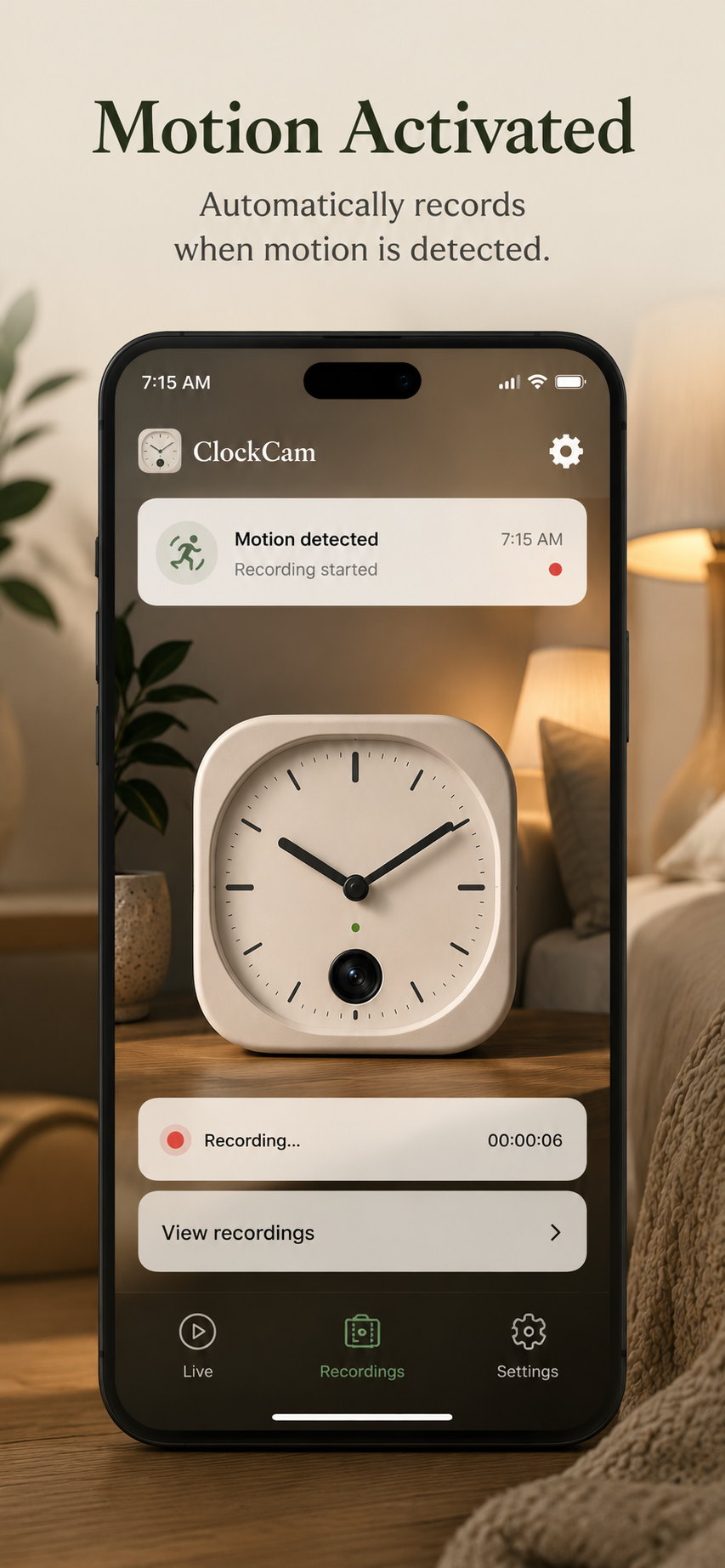
              <div className="app-hero-eye"><span className="dot"></span> MOTION-TRIGGERED · TIMESTAMPED</div>
              <h1>Trigger on motion. <span className="accent">Burn time onto every frame.</span></h1>
              <p>Surveillance-grade capture for the camera you already have. Detect motion, mark events, embed timestamps directly onto the video.</p>
              <DownloadBadges accent={app.accent} app={app}/>
            </div>
            <div className="app-mockup reveal in">
              <div className="accent-glow"></div>
              <img src="assets/mcc/01.png" alt="Motion Clock Camera hero"
                style={{position:"relative", zIndex:1, maxHeight: 620, borderRadius: 20, filter: `drop-shadow(0 30px 60px ${app.accent}40)`}}/>
            </div>
          </div>
        </div>
      </section>

      <FeaturedBanner src="assets/mcc/featured.png" accent={app.accent} alt="Motion Clock Camera featured"/>

      <section className="section-tight">
        <div className="container">
          <div className="feature-row reveal" style={{borderTop: "none"}}>
            <div className="feature-row-text">
              <div className="eyebrow" style={{color: app.accent}}>MOTION DETECTION</div>
              <h2>It only records when something moves.</h2>
              <p>Computer-vision powered motion sensing automatically starts and stops recording. Save storage. Skip the boring footage. Find the moments that matter, fast.</p>
              <ul style={{listStyle: "none", padding: 0, margin: "20px 0 0", display: "grid", gap: 10}}>
                {[
                  "Adjustable sensitivity — from leaves to people only",
                  "Pre-roll captures the 3 seconds before motion starts",
                  "Event-based clipping with thumbnails",
                ].map(t => (
                  <li key={t} style={{display:"flex",gap:10,alignItems:"center",color:"var(--text-2)",fontSize:15}}>
                    <div style={{width: 6, height: 6, borderRadius: "50%", background: app.accent}}></div>{t}
                  </li>
                ))}
              </ul>
            </div>
            <div className="feature-visual"><Icon name="activity" size={80} stroke={1.2} style={{color: app.accent, opacity: 0.6}}/></div>
          </div>

          <div className="feature-row reveal">
            <div className="feature-visual"><Icon name="clock" size={80} stroke={1.2} style={{color: app.accent, opacity: 0.6}}/></div>
            <div className="feature-row-text">
              <div className="eyebrow" style={{color: app.accent}}>TIMESTAMP OVERLAY</div>
              <h2>Time, date, GPS — burned right onto the frame.</h2>
              <p>Configurable overlays show the exact time, date, and optionally location on every frame. Position, font size, and color are all adjustable. Useful for evidence, logs, and any time-critical recording.</p>
            </div>
          </div>

          <div className="feature-row reveal">
            <div className="feature-row-text">
              <div className="eyebrow" style={{color: app.accent}}>4K · 60FPS · ENCRYPTED</div>
              <h2>Top-shelf capture, encrypted end to end.</h2>
              <p>Records up to 4K at 60fps with HDR. Footage is encrypted in transit and at rest. Export to your library or share manually when you choose.</p>
            </div>
            <div className="feature-visual"><Icon name="video" size={80} stroke={1.2} style={{color: app.accent, opacity: 0.6}}/></div>
          </div>
        </div>
      </section>

      {/* Gallery */}
      <section className="section-tight">
        <div className="container">
          <div className="reveal">
            <div className="eyebrow" style={{color: app.accent}}>SCREENSHOTS</div>
            <h2 className="section-title" style={{fontSize: "clamp(28px, 4vw, 40px)", marginBottom: 32}}>See it in action.</h2>
          </div>
          <div className="gallery">
            {[1,2,3,4].map(n => (
              <div key={n} style={{flexShrink: 0, scrollSnapAlign: "center", borderRadius: 14, overflow: "hidden", border: `1px solid ${app.accent}30`, boxShadow: `0 10px 30px ${app.accent}20`, background: "#000"}}>
                <img src={`assets/mcc/0${n}.png`} alt={`Screen ${n}`} style={{height: 540, display: "block"}}/>
              </div>
            ))}
          </div>
        </div>
      </section>
    </AppPage>
  );
};

// ===== TrueTide page =====
const TTPage = ({ navigate }) => {
  const app = APPS[2];
  return (
    <AppPage app={app} navigate={navigate}>
      <section className="app-hero">
        <div className="container">
          <div className="app-hero-grid">
            <div className="reveal in">
              <div className="app-hero-eye"><span className="dot"></span> SAME POSE · SAME LIGHT · EVERY WEEK</div>
              <h1>The progress photo app that <span className="accent">actually shows progress.</span></h1>
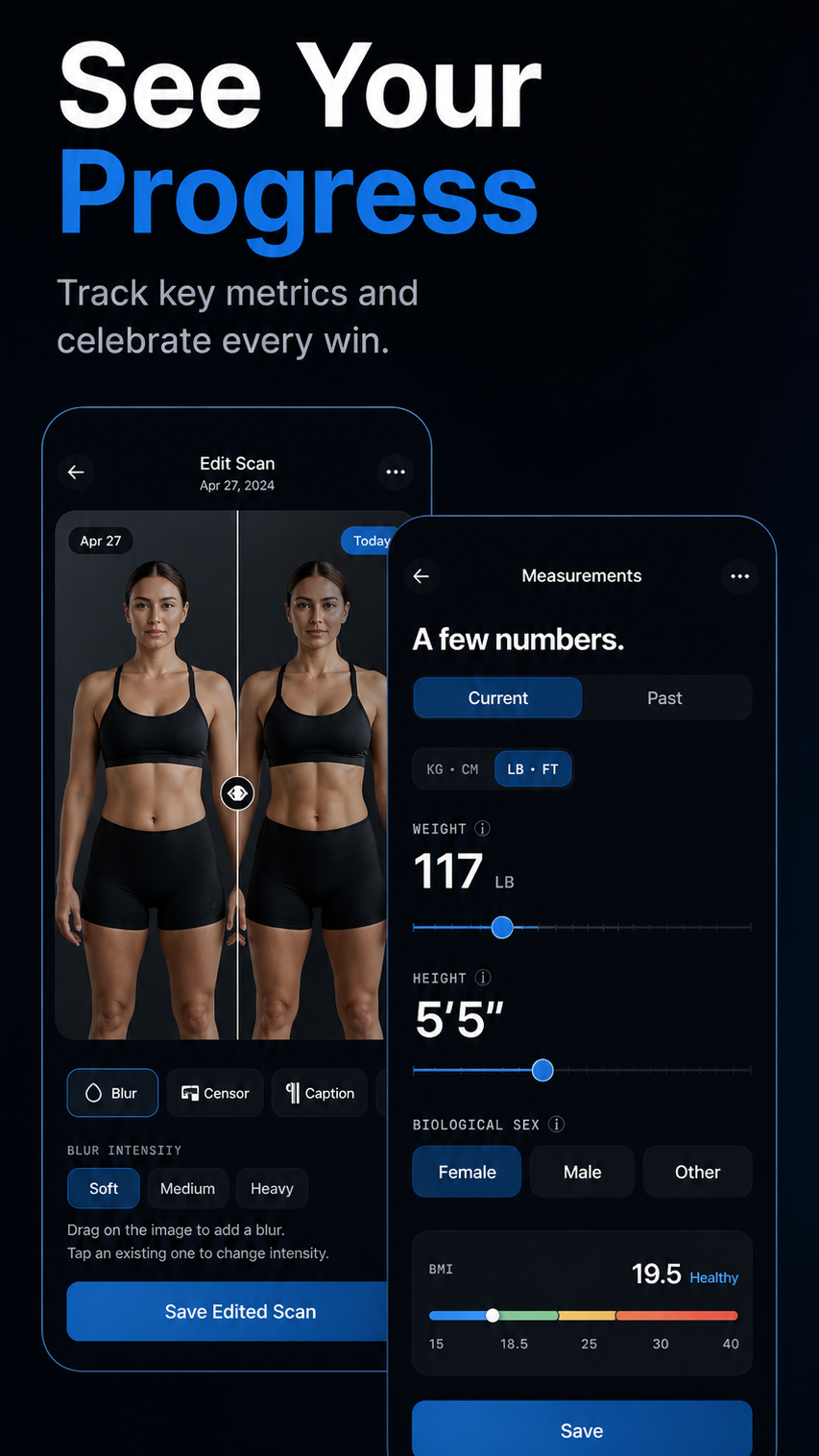
              <p>TrueTide overlays your last photo as a translucent guide so every shot is in the exact same frame. Compare side-by-side. See trends. Stop wondering if you're recomping or just bloated.</p>
              <DownloadBadges accent={app.accent} app={app}/>
            </div>
            <div className="app-mockup reveal in">
              <div className="accent-glow"></div>
              <img src="assets/truetide/01.png" alt="TrueTide hero"
                style={{position:"relative", zIndex:1, maxHeight: 620, borderRadius: 20, filter: `drop-shadow(0 30px 60px ${app.accent}40)`}}/>
            </div>
          </div>
        </div>
      </section>

      <FeaturedBanner src="assets/truetide/featured2.png" accent={app.accent} alt="TrueTide featured"/>

      <section className="section-tight">
        <div className="container">
          <div className="feature-row reveal" style={{borderTop:"none"}}>
            <div className="feature-row-text">
              <div className="eyebrow" style={{color: app.accent}}>POSE GHOSTING</div>
              <h2>The last photo, faded over the live camera.</h2>
              <p>A semi-transparent overlay of your previous shot helps you line up perfectly. Same angle, same distance, same body position. Compare like-for-like — not "I think I look leaner today."</p>
            </div>
            <div className="feature-visual"><Icon name="image" size={80} stroke={1.2} style={{color: app.accent, opacity: 0.6}}/></div>
          </div>
          <div className="feature-row reveal">
            <div className="feature-visual"><Icon name="trending-up" size={80} stroke={1.2} style={{color: app.accent, opacity: 0.6}}/></div>
            <div className="feature-row-text">
              <div className="eyebrow" style={{color: app.accent}}>TREND CHARTS</div>
              <h2>Weight, measurements, lifts — over time.</h2>
              <p>Log weight, body measurements, and key lifts alongside your photos. The trend tells the truth more than any single weigh-in.</p>
            </div>
          </div>
          <div className="feature-row reveal">
            <div className="feature-row-text">
              <div className="eyebrow" style={{color: app.accent}}>ENCRYPTED END TO END</div>
              <h2>Your photos, encrypted in transit and at rest.</h2>
              <p>Backed up only when you opt in. Sharing is always one-tap and explicit — never automatic. We never sell your data.</p>
            </div>
            <div className="feature-visual"><Icon name="shield" size={80} stroke={1.2} style={{color: app.accent, opacity: 0.6}}/></div>
          </div>
        </div>
      </section>

      {/* Gallery */}
      <section className="section-tight">
        <div className="container">
          <div className="reveal">
            <div className="eyebrow" style={{color: app.accent}}>SCREENSHOTS</div>
            <h2 className="section-title" style={{fontSize: "clamp(28px, 4vw, 40px)", marginBottom: 32}}>See it in action.</h2>
          </div>
          <div className="gallery">
            {[1,2,3,4,5,6].map(n => (
              <div key={n} style={{flexShrink: 0, scrollSnapAlign: "center", borderRadius: 14, overflow: "hidden", border: `1px solid ${app.accent}30`, boxShadow: `0 10px 30px ${app.accent}20`, background: "#000"}}>
                <img src={`assets/truetide/0${n}.png`} alt={`Screen ${n}`} style={{height: 540, display: "block"}}/>
              </div>
            ))}
          </div>
        </div>
      </section>
    </AppPage>
  );
};

// ===== Dual Camera page =====
const DCPage = ({ navigate }) => {
  const app = APPS[3];
  return (
    <AppPage app={app} navigate={navigate}>
      <section className="app-hero">
        <div className="container">
          <div className="app-hero-grid">
            <div className="reveal in">
              <div className="app-hero-eye"><span className="dot"></span> COMING SOON · FRONT + BACK · SIMULTANEOUS</div>
              <h1>React. Vlog. <span className="accent">React again.</span></h1>
              <p>Record from front and back lenses at the same time, with synced audio. Picture-in-picture, side-by-side, or stacked. Made for storytellers, vloggers, and people who hate having to choose.</p>
              <div style={{display:"inline-flex",alignItems:"center",gap:10,padding:"10px 18px",borderRadius:12,background:`${app.accent}15`,border:`1px solid ${app.accent}50`,color:app.accent,fontWeight:600,fontSize:14}}>
                <span style={{width:8,height:8,borderRadius:"50%",background:app.accent,boxShadow:`0 0 10px ${app.accent}`}}></span>
                In development — sign up below to get notified at launch
              </div>
            </div>
            <div className="app-mockup reveal in">
              <div className="accent-glow"></div>
              <PhoneFrame screenStyle={{background: "#000"}}>
                <DCScreen active={true}/>
              </PhoneFrame>
            </div>
          </div>
        </div>
      </section>

      <section className="section-tight">
        <div className="container">
          <div className="feature-row reveal" style={{borderTop:"none"}}>
            <div className="feature-row-text">
              <div className="eyebrow" style={{color: app.accent}}>THREE LAYOUTS</div>
              <h2>Pick your composition.</h2>
              <p>Picture-in-picture for reaction-style content, side-by-side for symmetric framing, stacked for vertical formats. Switch on the fly during recording — the source streams keep rolling.</p>
              <div style={{display:"grid",gridTemplateColumns:"repeat(3,1fr)",gap:12,marginTop:20}}>
                {[
                  {label:"PiP", inner:<><div style={{position:"absolute",inset:0,borderRadius:6,background:`${app.accent}20`}}></div><div style={{position:"absolute",bottom:6,right:6,width:24,height:32,borderRadius:4,background:app.accent,boxShadow:`0 0 8px ${app.accent}`}}></div></>},
                  {label:"Side-by-side", inner:<><div style={{position:"absolute",inset:0,borderRadius:6,background:`${app.accent}20`,clipPath:"inset(0 50% 0 0)"}}></div><div style={{position:"absolute",inset:0,borderRadius:6,background:app.accent,clipPath:"inset(0 0 0 50%)",opacity:0.7}}></div></>},
                  {label:"Stacked", inner:<><div style={{position:"absolute",inset:0,borderRadius:6,background:`${app.accent}20`,clipPath:"inset(0 0 50% 0)"}}></div><div style={{position:"absolute",inset:0,borderRadius:6,background:app.accent,clipPath:"inset(50% 0 0 0)",opacity:0.7}}></div></>},
                ].map(l => (
                  <div key={l.label} style={{position:"relative",aspectRatio:"3/4",border:`1px solid ${app.accent}40`,borderRadius:8,overflow:"hidden",background:"#0a0a10"}}>
                    {l.inner}
                    <div style={{position:"absolute",bottom:6,left:6,fontSize:10,color:"#fff",fontFamily:"var(--font-mono)",background:"rgba(0,0,0,0.5)",padding:"2px 6px",borderRadius:4}}>{l.label}</div>
                  </div>
                ))}
              </div>
            </div>
            <div className="feature-visual"><Icon name="switch-camera" size={80} stroke={1.2} style={{color: app.accent, opacity: 0.6}}/></div>
          </div>
          <div className="feature-row reveal">
            <div className="feature-visual"><Icon name="zap" size={80} stroke={1.2} style={{color: app.accent, opacity: 0.6}}/></div>
            <div className="feature-row-text">
              <div className="eyebrow" style={{color: app.accent}}>4K HDR · SYNCED AUDIO</div>
              <h2>Both lenses, both mics, perfectly aligned.</h2>
              <p>Records both streams at up to 4K HDR with frame-accurate sync. Audio mixes from both microphones with ducking, or pick one source and lock it in.</p>
            </div>
          </div>
        </div>
      </section>
    </AppPage>
  );
};

window.PVRPage = PVRPage;
window.MCCPage = MCCPage;
window.TTPage = TTPage;
window.DCPage = DCPage;